Every Hermes Agent Concept Explained for Normal People — The AI Architects
Source: — The AI Architects (Tom Crawshaw). 40 minutes, 18 chapter entries (15 numbered concepts plus intro, a hosting segment and a recap), published 24 August 2026.
A plain-English tour of every part of Hermes — taken one concept at a time, using the presenter’s own diagrams. I have lifted the diagram slides out of the video and dropped each one into the section where it belongs, so the note reads as one document.
Why this is useful: this is the clearest non-technical explanation of Hermes I have seen, and it is pitched exactly at the “I have never used a terminal” level. It is good on-ramp material for Son - Future Hermes Instance — it explains what the parts are, before he has to worry about how to drive them.
Intro
The pitch: Hermes is the closest thing to an “autonomous AI employee” that a non-coder can actually use — you can give it tools, message it from your phone, and it can work while you sleep. The catch is that to get real value you have to know three things: what it can see, what it can remember, and what you are allowing it to do.
1. Hermes vs the model (the harness and the brain)
The single most important idea in the video: Hermes and the AI model are two different things. The model is the engine (the raw intelligence); Hermes is everything else that makes the engine useful — the wheels, chassis, brakes and electronics. In Hermes terms that “everything else” is the tools, the rules, the sessions and the memory.
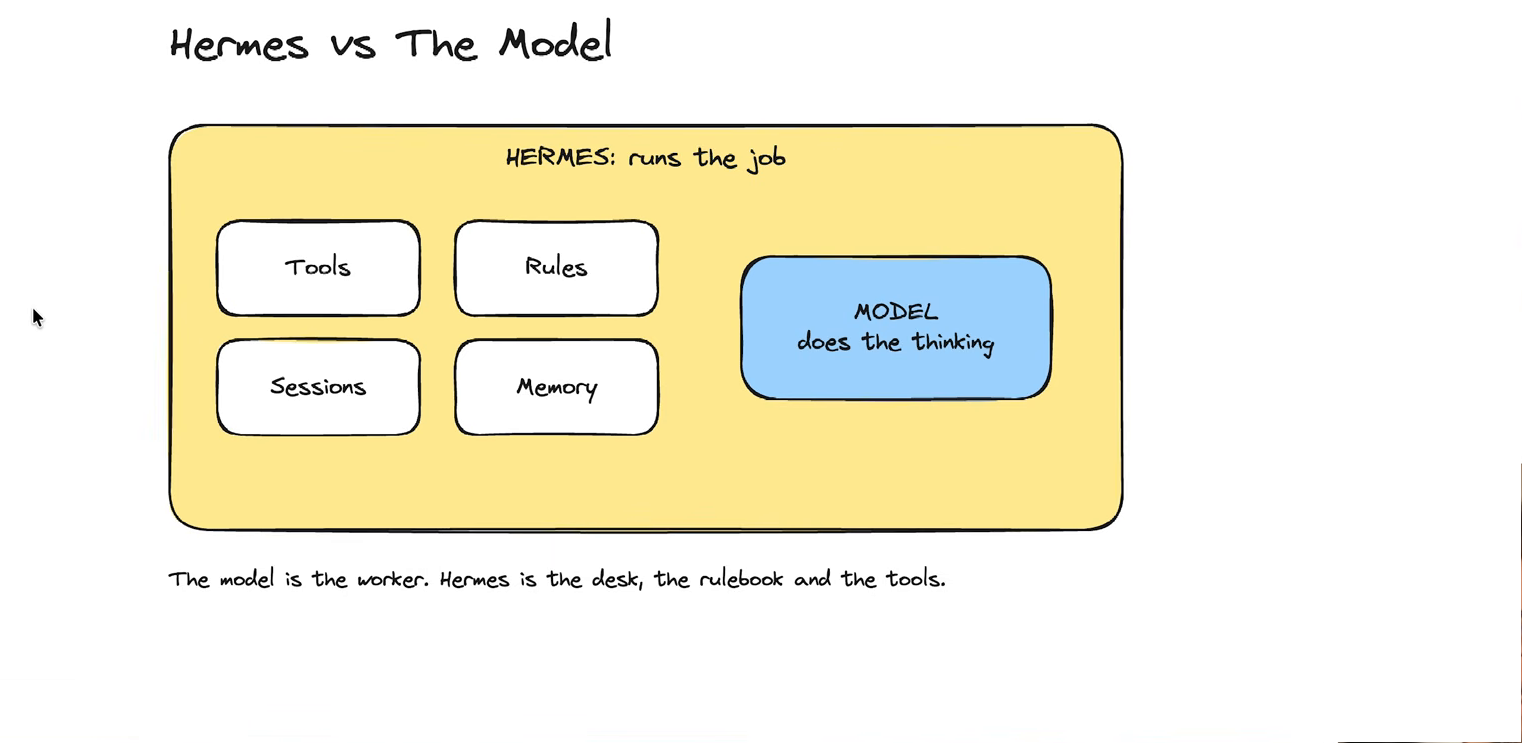
The model is the worker. Hermes is the desk, the rulebook and the tools. (Frame @ 2:30.)
Because the two layers are separate, you can swap the model for a different one — or a cheaper one — without changing anything else about your agent, and you can edit the “harness” freely. He contrasts this with closed tools like Claude Code, where the wiring underneath is proprietary and fixed.
2. Models and providers
The same underlying model can be reached through different companies (“providers”), and the provider — not the model — is what determines price and access. You can also run a model on your own hardware instead, which is slower in practice but keeps everything local.
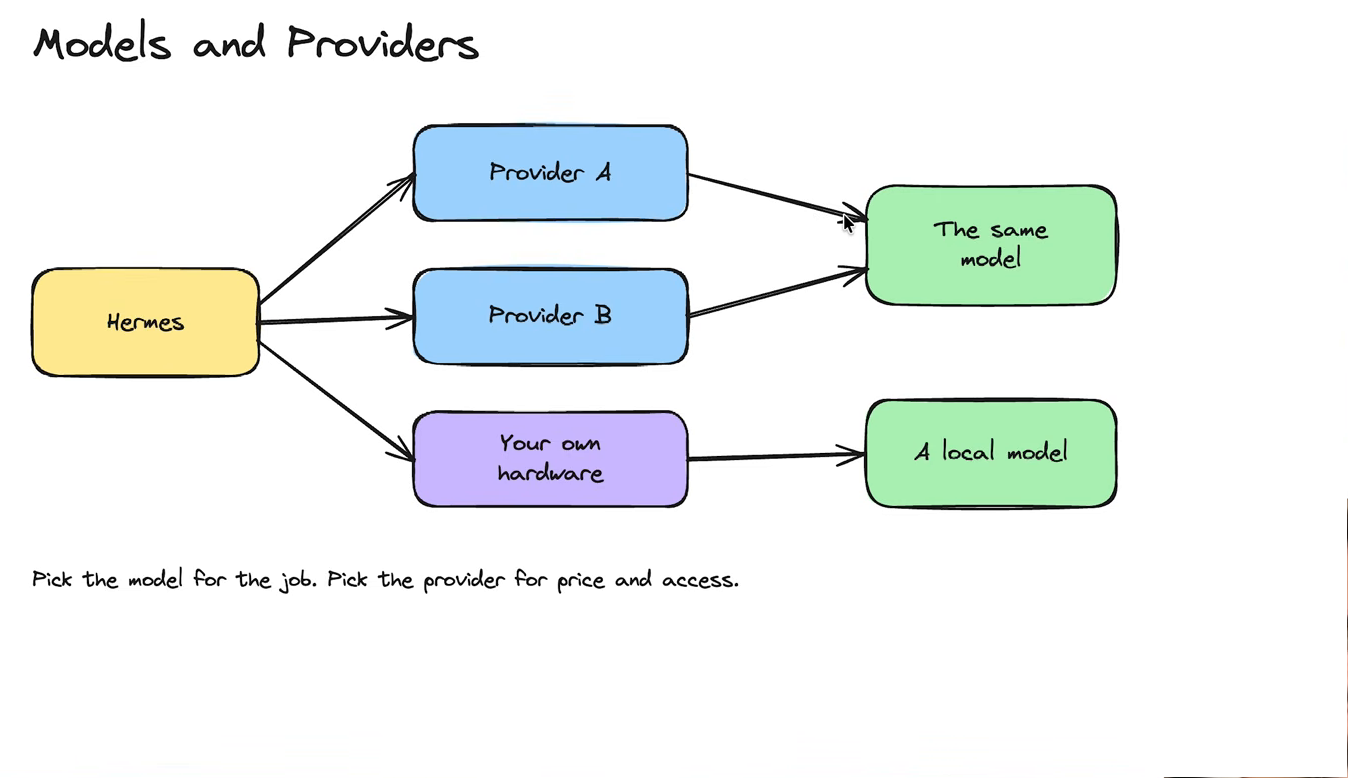
Highly recommended for Value (Performance for Price) : Deepseek v4.1 Flash
His everyday example: he plans content with a strong, expensive model and then writes it with a cheaper open-source one, set up so the routing happens automatically.
3. Interfaces: terminal, desktop, API, messaging, voice
An interface is just where you talk to Hermes. The terminal is the standard one; the desktop app is for people who don’t want a terminal, and it can show a live preview of what is being built; Telegram and Discord let you use it from your phone; there is an API/SDK for developers; and voice lets you simply talk to it. All of these are front doors to the same agent.
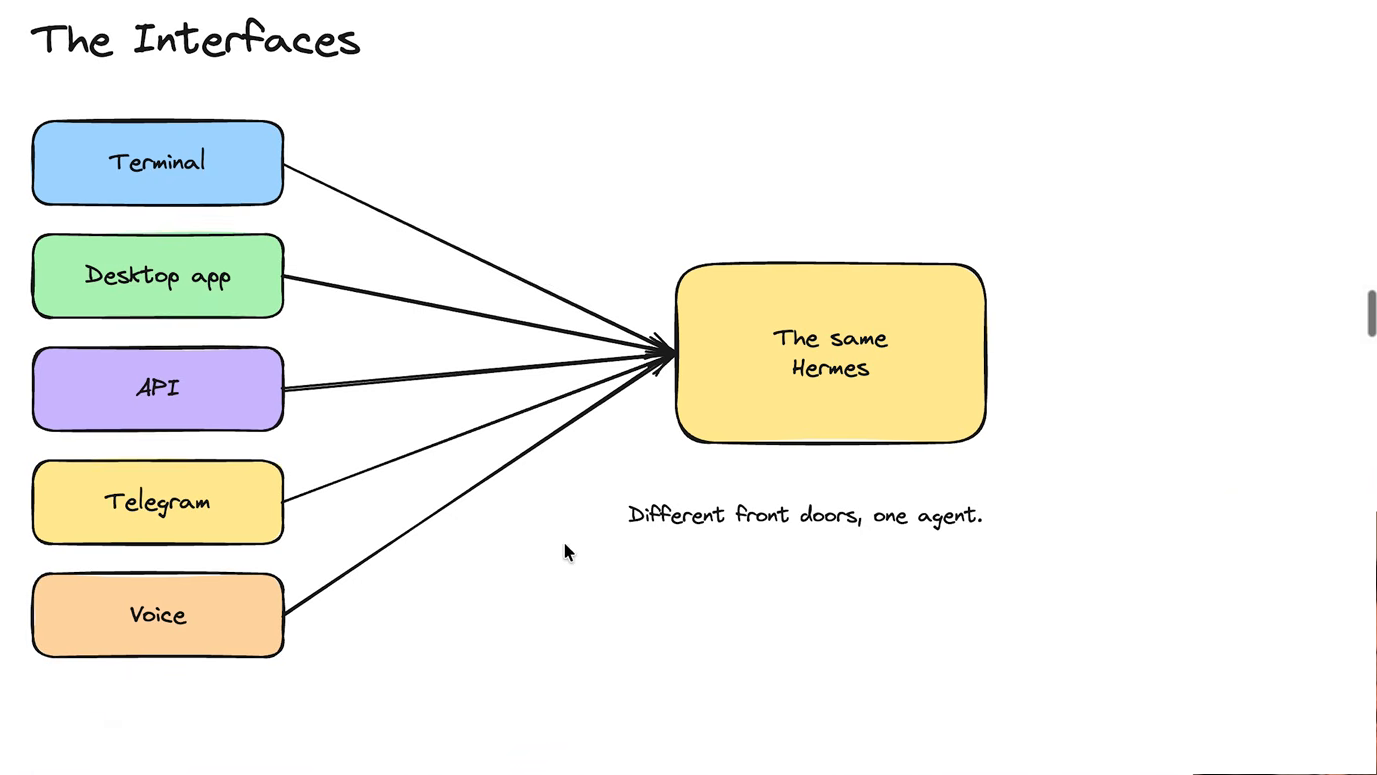
Different front doors, one agent. (Frame @ 7:10.)
He demonstrates the Discord voice channel specifically — you invite the bot into a voice channel and speak to it — and notes there is no mobile desktop app yet.
Hermes-Relay is good on Android. Nothing official yet though
4. Prompts, SOUL.md and project instructions
Three layers of context, each with a different job:
- the prompt is this request, right now;
- project rules (an
AGENTS.mdin a folder) apply whenever Hermes works inside that folder; - SOUL.md is the agent’s standing character — its role, voice, tone, and how direct it should be.
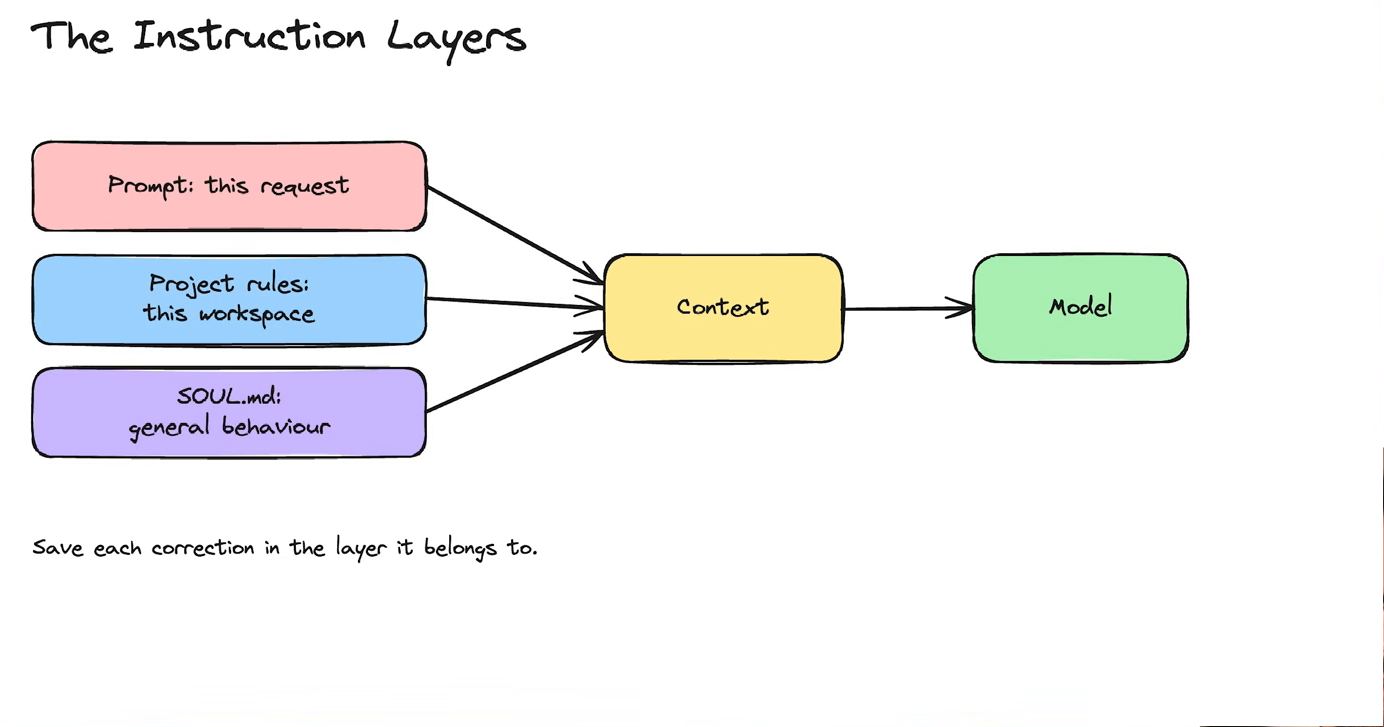
Prompt = this request. Project rules = this workspace. SOUL.md = general behaviour. (Frame @ 7:30.)
His rule of thumb: when Hermes keeps making the same mistake, save the correction in the layer it belongs to — a one-off goes in the prompt, a workspace rule goes in the project file, a lasting behaviour goes in SOUL.md.
5. Context, sessions and compression
The context window is the model’s working memory, and it is finite — different models have different sizes. Everything you send, everything the tools return, and everything Hermes has decided to remember all take up space in it. When it starts filling up, Hermes compresses: older detail is replaced by a short summary so the job can keep going.
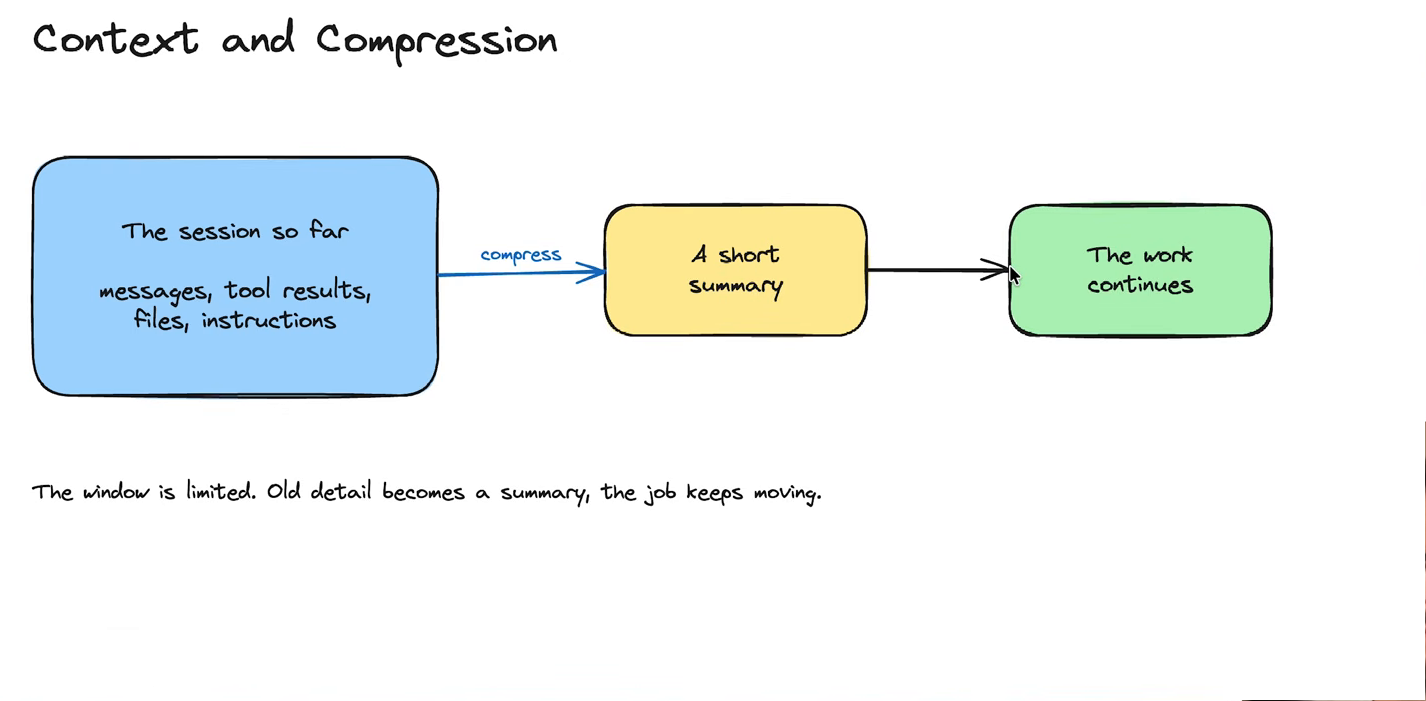
The window is limited. Old detail becomes a summary, the job keeps moving. (Frame @ 12:10.)
The trade-off he is honest about: summarising saves space but you lose detail — so anything that matters must live in a file, not only in the conversation.
6. The agent loop
What actually happens on each turn: your request goes in, Hermes packs the context, the model thinks, and then the model decides whether it needs a tool. If yes, Hermes runs the tool, feeds the result back, and the model thinks again. If no, you get the final answer. For building work he describes two phases — planning (search files, research, agree a plan) and building (an autonomous loop that keeps checking its own work against the goal).
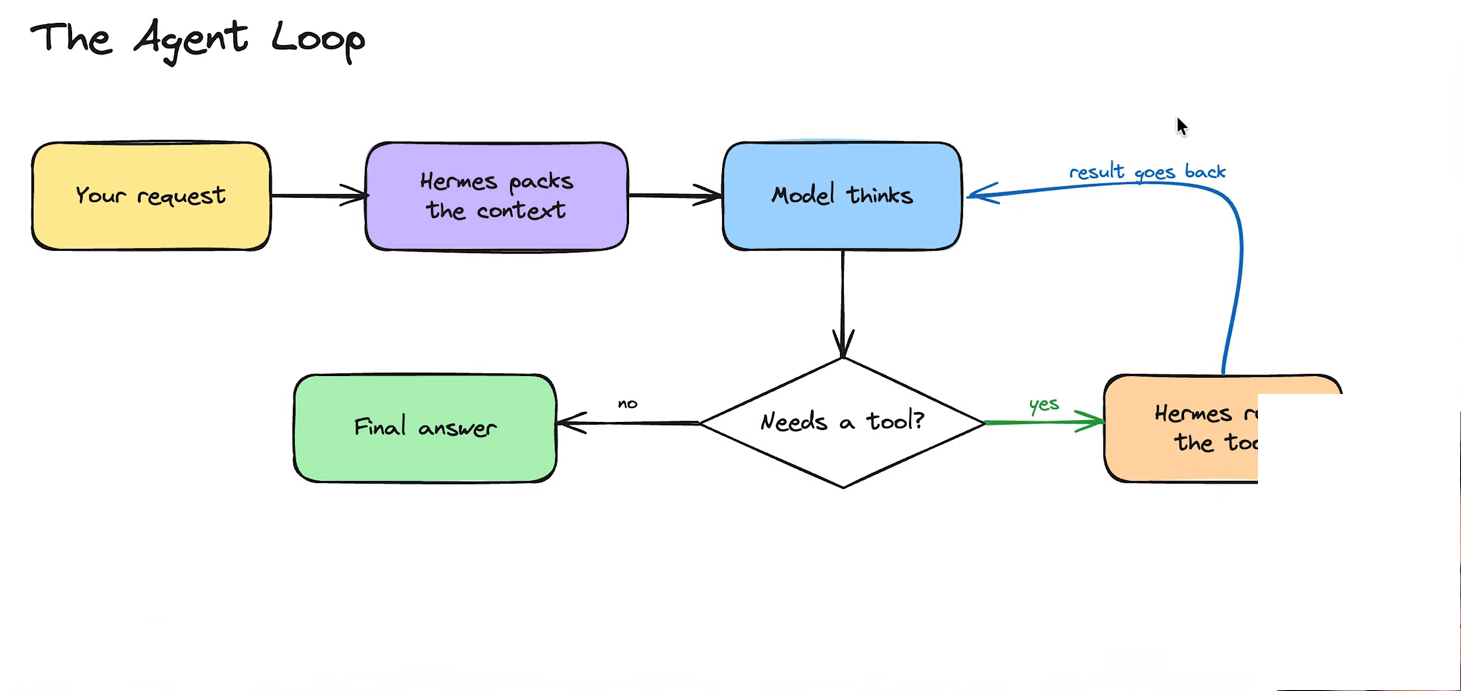
Request → context → think → need a tool? → act, and loop. (Frame @ 13:50.)
7. Tools, toolsets, Tool Gateway and MCP
Tools are what let the agent do things rather than just talk: search the web, run a command, call a service. They arrive from three places — the tools built into Hermes, hosted tools via a Tool Gateway, and MCP servers, which are other people’s tools wrapped up so your agent can use them. He compares an MCP to an API: the API has endpoints, the MCP turns each endpoint into a tool in your toolbox.
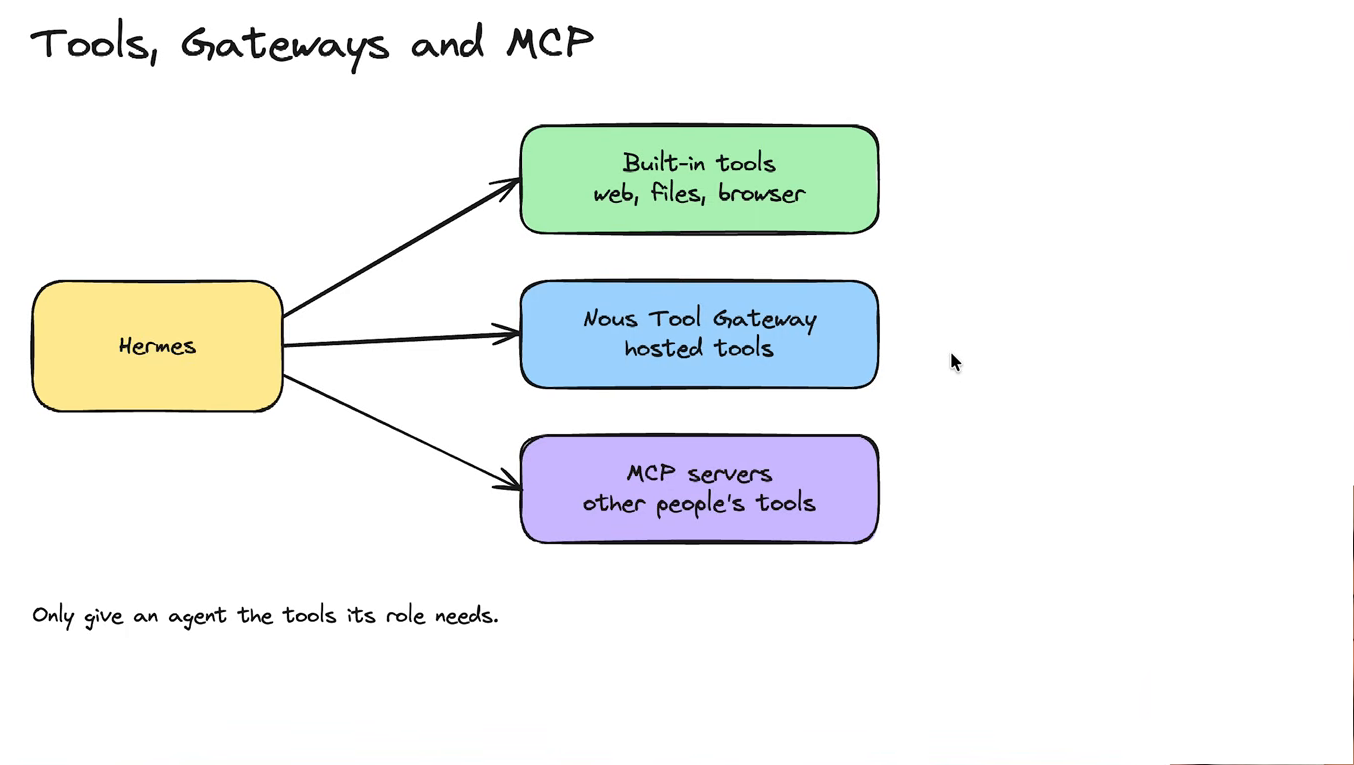
Only give an agent the tools its role needs. (Frame @ 15:20.)
His hard-won lesson: he arrived at a fresh install with 15–20% of the context window already consumed by tools he would never use, and had to audit and remove them. “Plugins” are the packaged version of the same idea — a bundle of skills, and often an MCP and hooks, installed together.
8. Memory vs skills
- Memory answers what should Hermes remember? — your preferences, past decisions, facts about your work.
- A skill answers how should Hermes do this thing? — a repeatable method, with the steps and rules for that kind of job.
- Neither one retrains the model. Both are simply loaded into the context window when they are relevant.
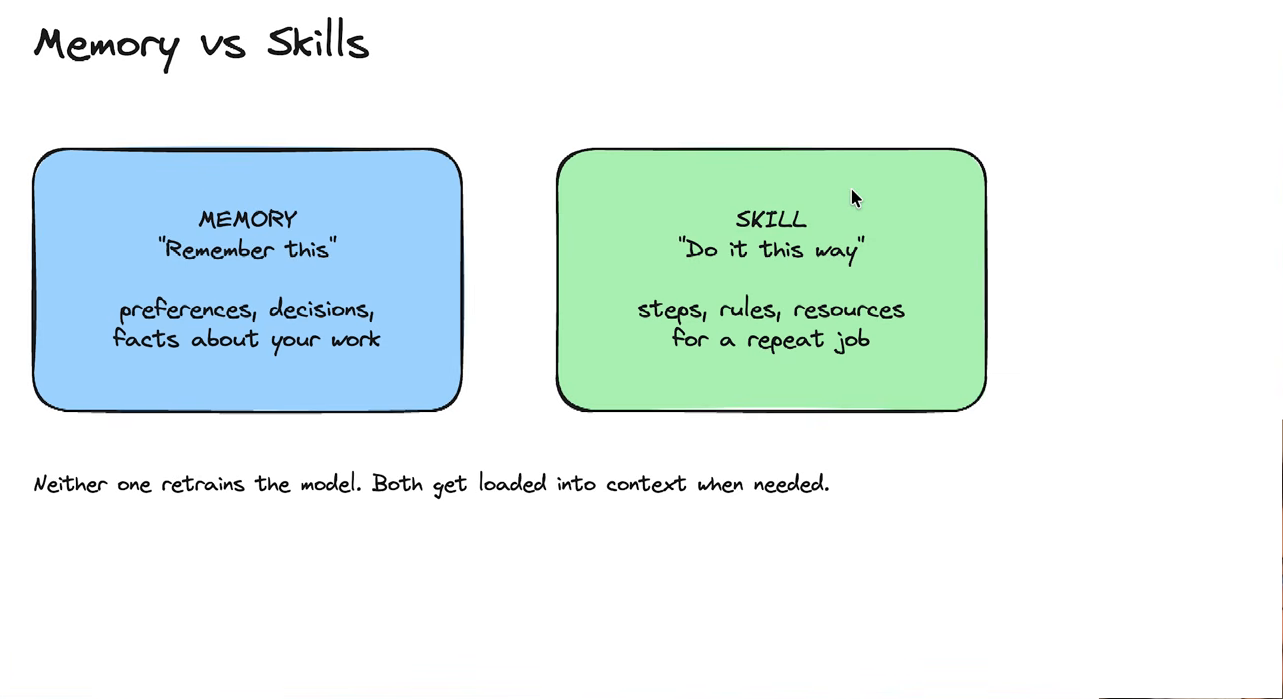
Neither one retrains the model. Both get loaded into context when needed. (Frame @ 18:20.)
He flags that memory is deliberately small, which is why he also keeps a searchable “second brain” of files that can be pulled in on demand. Skills can be written by Hermes itself — either from a process you just went through (/learn), or automatically as it notices a repeatable pattern.
9. Hooks
A hook is an action that fires automatically when something specific happens — before a tool runs, after a job finishes, when a session starts, when a file is written. The useful property: a hook runs outside the conversation, so it costs no context. His example is a hook that stops the agent from reading the .env file into the chat, so API keys can never appear in a transcript. The clean summary: memory is “remember this”, a skill is “do it this way”, a hook is “whenever X happens, always do Y”.
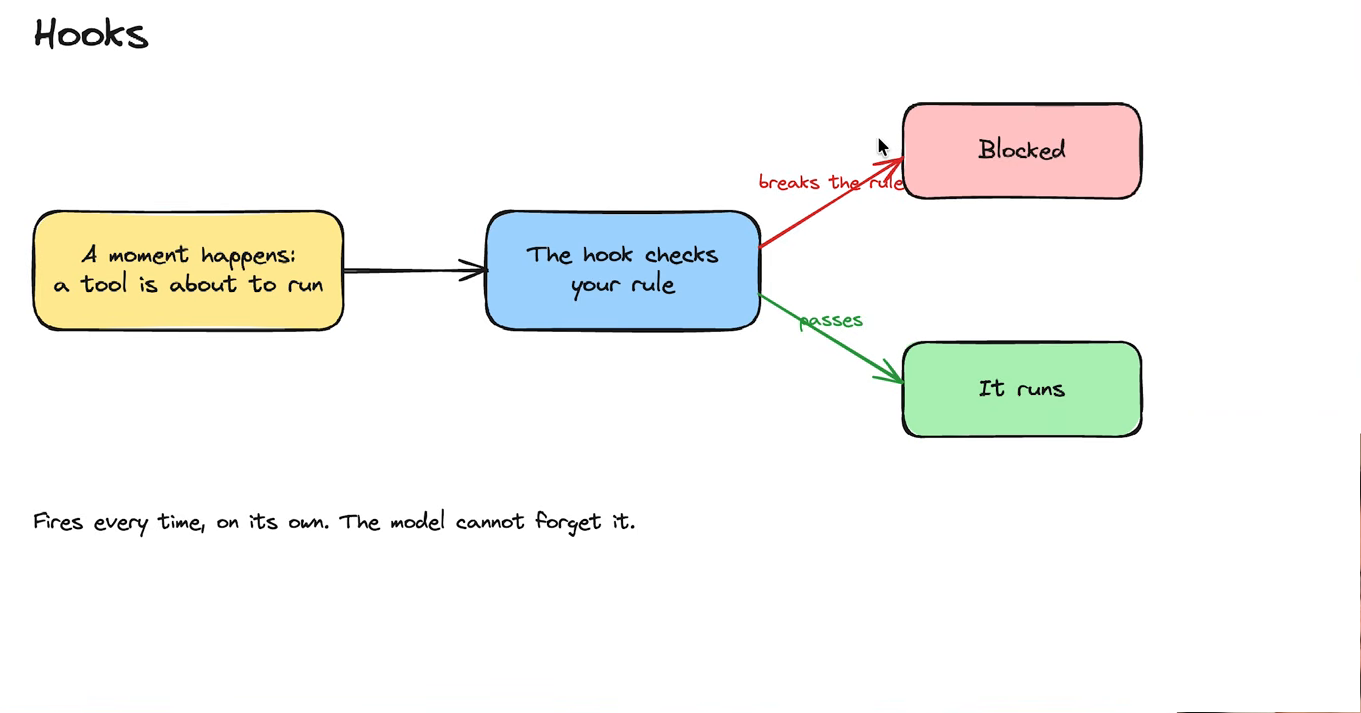
A moment happens → the hook checks your rule → blocked, or it runs. Fires every time, on its own; the model cannot forget it. (Frame @ 20:30.)
10. Profiles
A profile is a whole Hermes instance for a role, a person or a type of work — its own SOUL.md, its own memory, skills, tools, models and history. A research profile and an operations profile don’t have to share instructions. They matter for orchestration (his kanban agents are separate profiles passing work between each other).
Two precise points worth keeping: profiles are not a security boundary by themselves (boundaries come from tools, permissions, and where Hermes runs), and a profile is not a subagent — a subagent is a temporary helper spun up inside a session, then thrown away.
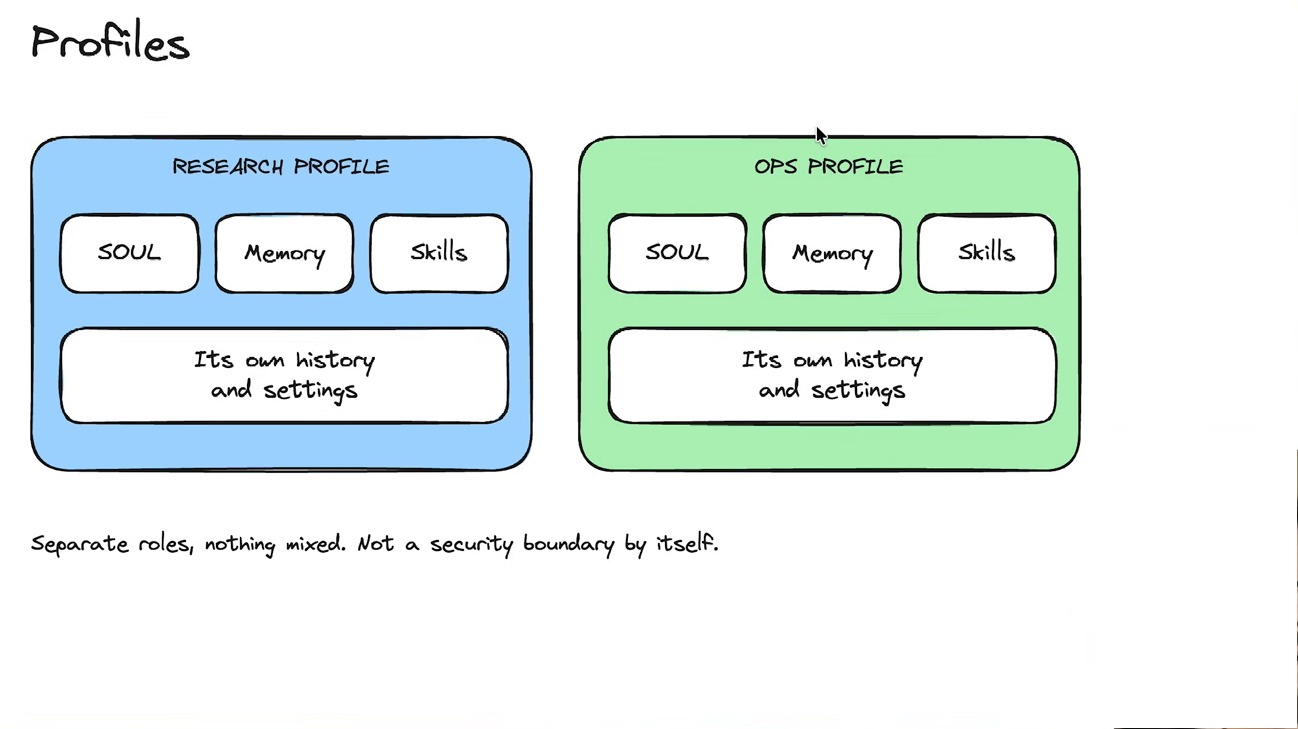
Separate roles, nothing mixed: each profile has its own SOUL, memory, skills, history and settings — and that is role hygiene, not a security wall. (Frame @ 22:30.)
10.1 Alf
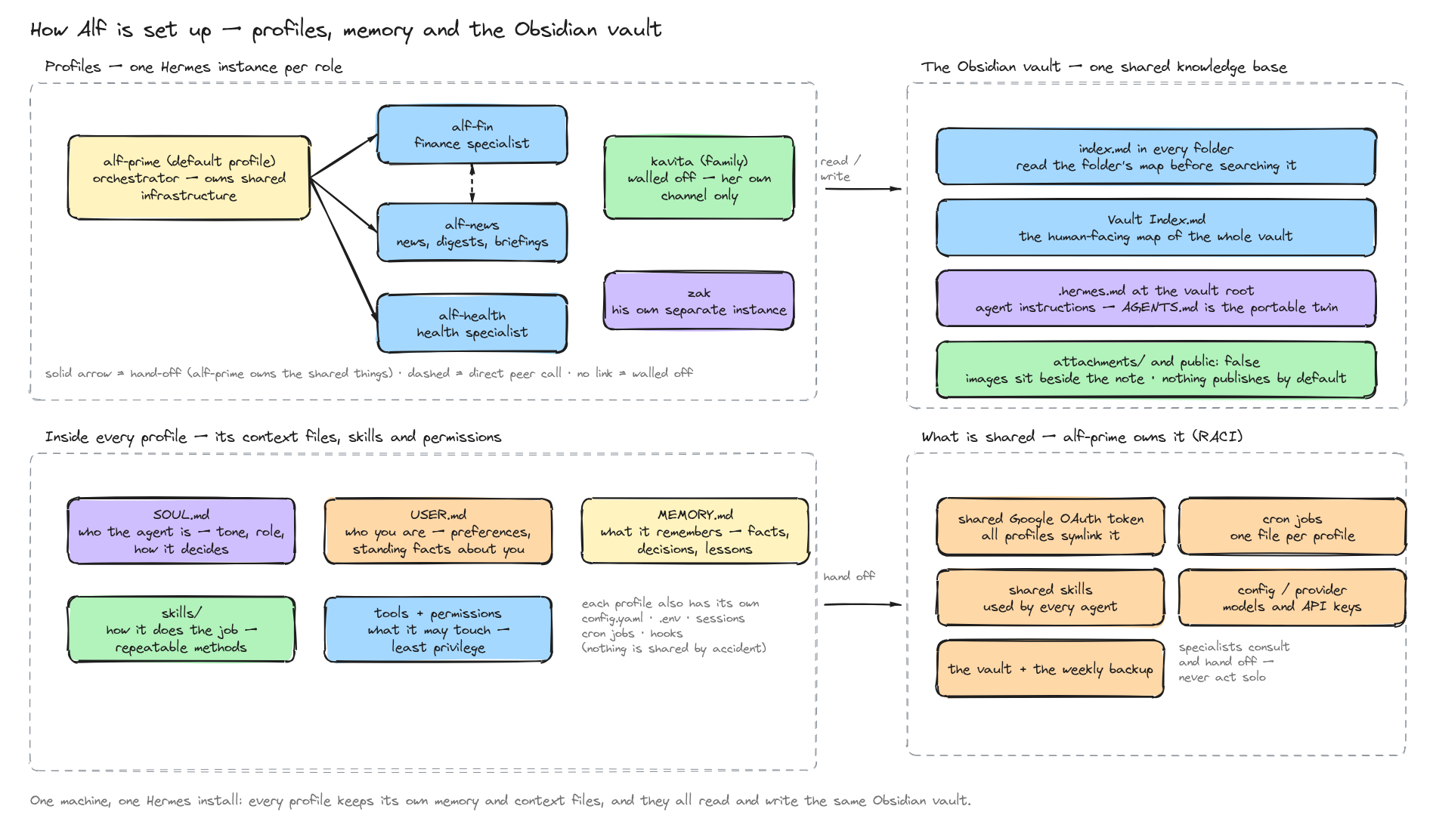
Delivered 2026-09-19. The drawing below is the live Excalidraw file — edit it right here in Obsidian. The owner’s prompt above is kept as the record of what was asked.
Transclude of Alf-—-Profiles-and-Memory-Layout.excalidraw
What the drawing shows
Alf is one Hermes install on one machine, divided into profiles — think of separate employees sharing one office. alf-prime is the default profile and the orchestrator: it owns everything shared. The specialists (alf-fin, alf-news, alf-health) each work in one domain, and they hand shared changes back rather than acting alone. kavita is deliberately walled off on her own channel, and zak is a separate instance again.
Every profile is built from the same parts (a brand-new profile gains its USER.md and MEMORY.md the first time it is used): a SOUL.md (who the agent is), a USER.md (who you are), a MEMORY.md (what it remembers), its own skills/ (how it does a job), and its own tools and permissions (what it is allowed to touch). Each keeps its own config.yaml, .env, sessions, cron jobs and hooks — so nothing leaks between them by accident.
All of them read and write the same Obsidian vault. That is the part worth understanding: the vault carries an index.md in every folder, listing what is inside it, so an agent reads a folder’s map before searching the folder. That is the difference between “the agent has my notes” and “the agent has to load my entire vault into its head”.
How this connects to the sections above
- Profiles → 10. Profiles: a profile is a whole Hermes instance with its own identity and memory, not a mode switch.
SOUL.mdand project rules → 4. Prompts, SOUL.md and project instructions: the same three layers — this request, this workspace, the agent’s standing character — stored per profile instead of per folder.USER.mdandMEMORY.md→ 8. Memory vs skills: memory is what it should remember, skills are how it should do things, and neither retrains the model.skills/, tools and permissions → 7. Tools, toolsets, Tool Gateway and MCP and 15. Permissions, approvals and sandboxing: the toolset is what an agent may request, permissions are what it may reach.index.mdmaps → 5. Context, sessions and compression: the reason the vault is indexed is that the context window is limited. Read the map; don’t load the territory.- Who owns what → 10. Profiles again: knowing who owns a shared thing is what stops two agents fighting over the same token.
The next thing to read
If Obsidian itself is new — what a folder is, what frontmatter is, how [[wikilinks]] hold the graph together — start with Obsidian and Markdown Beginner Guides. This drawing assumes that vocabulary; that note teaches it.
Related: Son - Future Hermes Instance · Filesystem Access and Profile Isolation Policy · Multi-Agent Topology · Agent Context Files
11. Messaging Gateway and integrations
The gateway is what lets Hermes live inside Slack, Discord or Telegram: it carries the chat, normalises the messages, and routes them to whichever profile should answer.
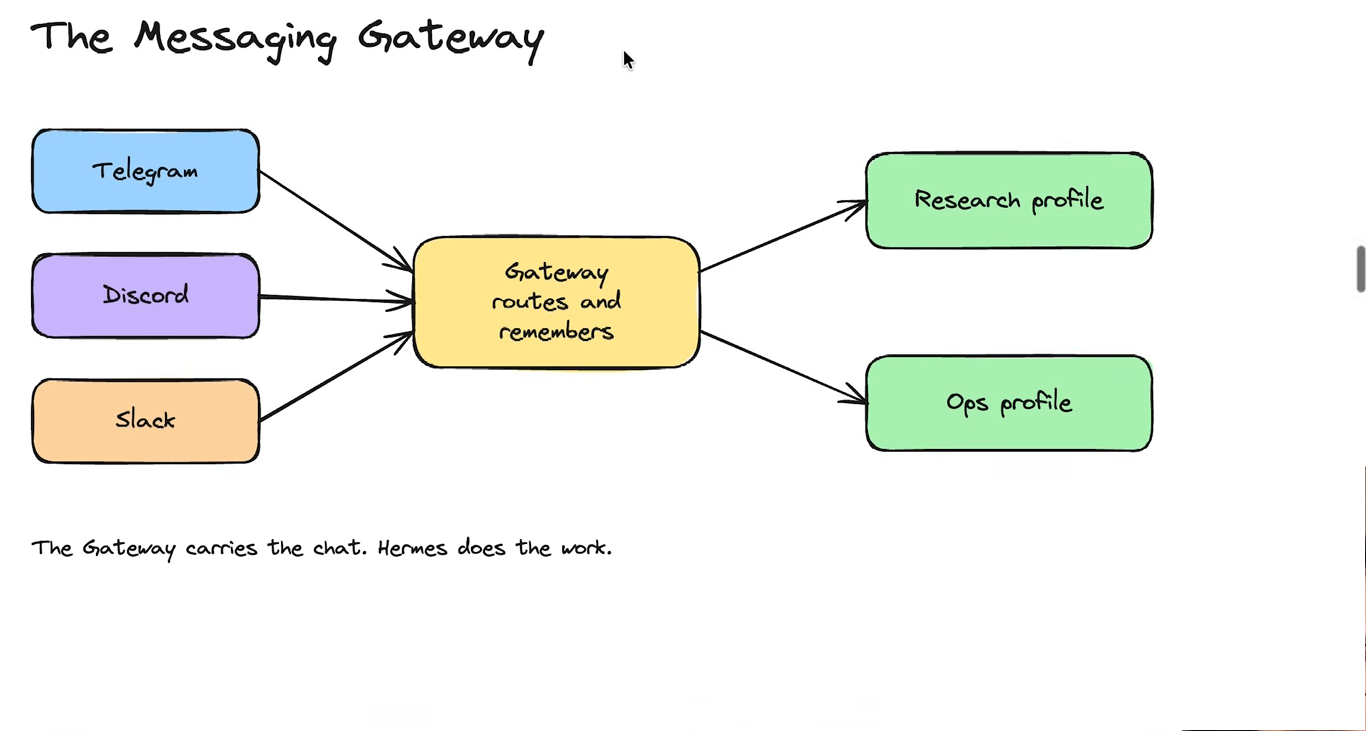
The gateway carries the chat. Hermes does the work. (Frame @ 25:40.)
Different agents can have different gateways, and you can switch profile inside the gateway. Setting one up means creating an app in the platform to get keys and a bot token, then giving those to Hermes.
12. Local vs VPS vs cloud (and where commands run)
The same agent can run in three places, and it is worth knowing which is which: on your own machine, on an always-on server (VPS), or in the cloud. This is mostly about where your files and keys live and who can reach them — genuinely local means no shared knowledge between people, while a shared cloud setup means everyone’s agent can use the same context, tools and keys.
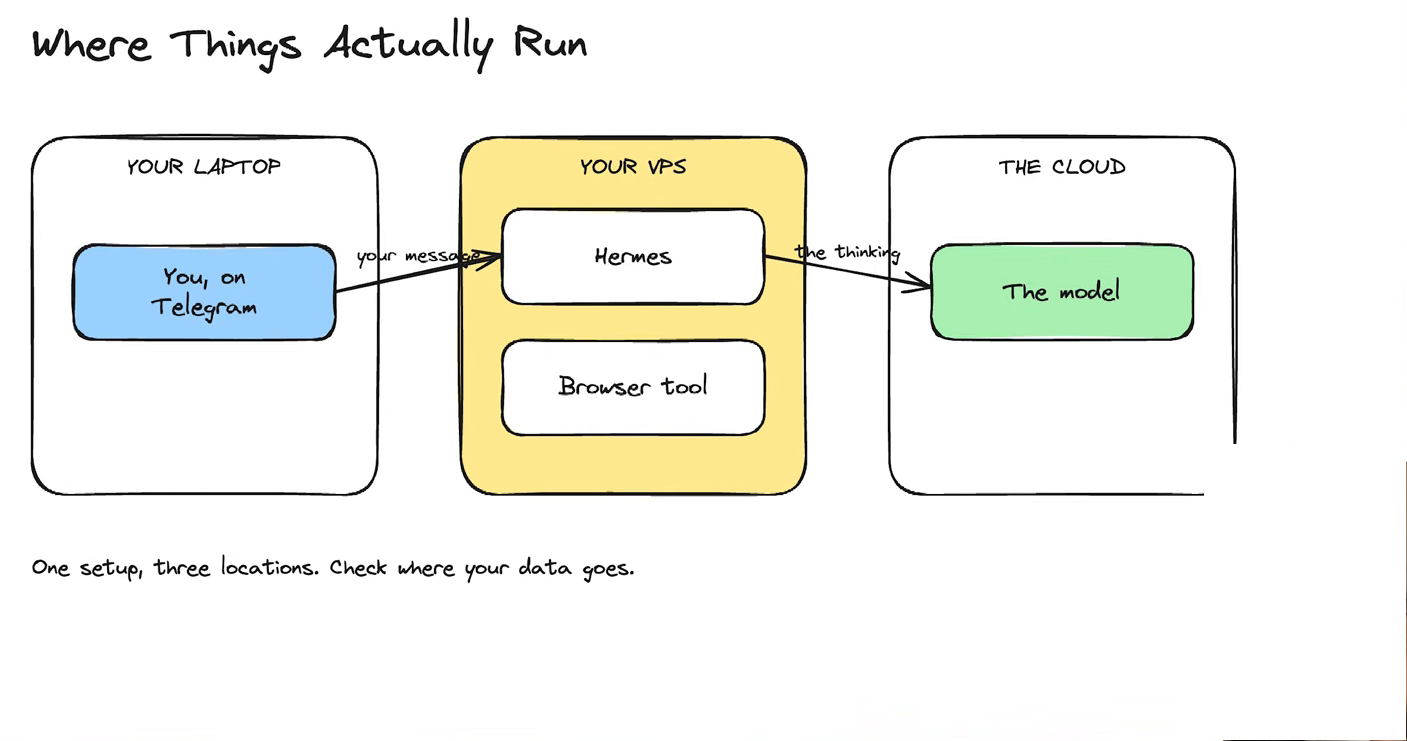
One setup, three locations. Check where your data goes. (Frame @ 29:40.)
13. Scheduled tasks and automated workflows
Scheduled tasks (cron jobs) let Hermes start work on its own, without you sending anything. Because nobody is watching, the job must stand on its own instructions — which is why a scheduled job is usually “run this skill”, with the skill holding the instructions, the context and any MCP connections it needs. His example: a daily job that grabs his morning post, finds relevant YouTube interviews, cuts clips, and sends them to Telegram plus a folder.
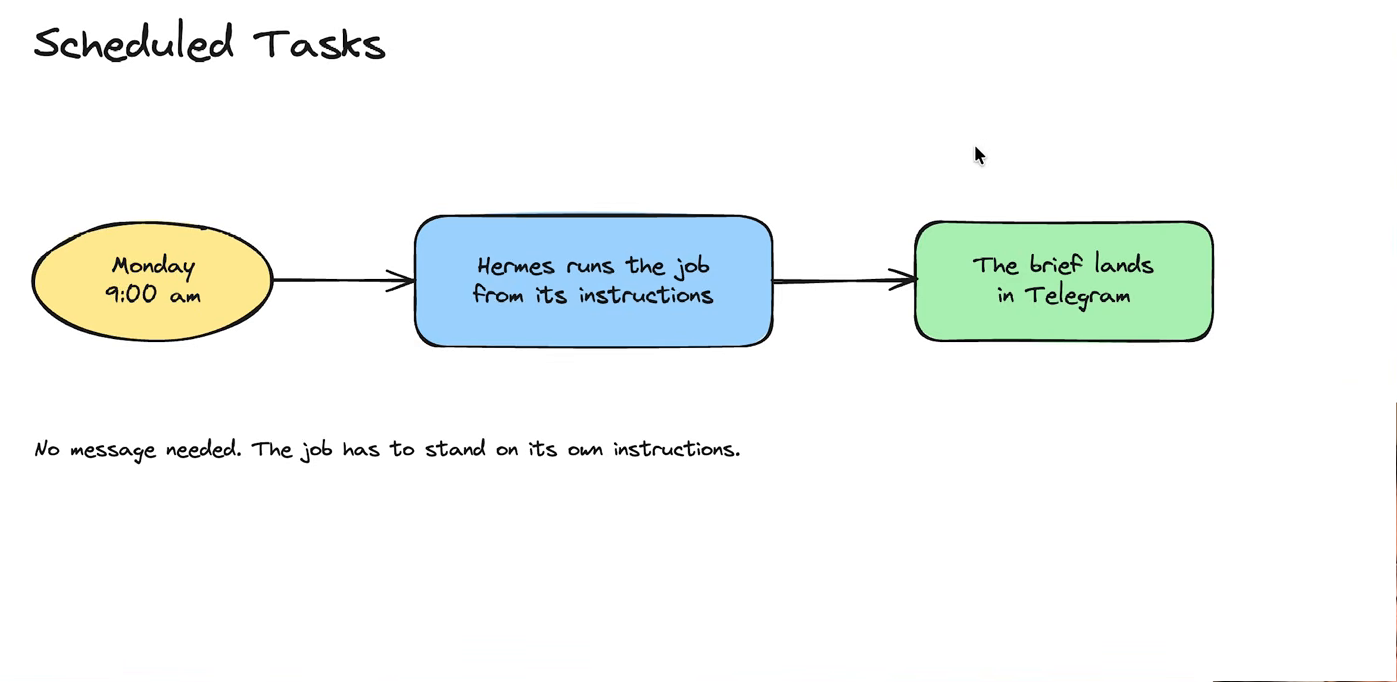
No message needed. The job has to stand on its own instructions. (Frame @ 31:20.)
Two related mechanisms: fixed scripts (deterministic code — good for moving numbers around) and webhooks (an outside event pings Hermes to trigger a task).
14. Subagents vs Kanban and agent-to-agent
Two different ways to get parallel work, and he is clear they are not the same thing:
- Subagents are quick, temporary helpers created inside a session — “read these ten articles and summarise each” — and they vanish when they are done.
- Kanban is a board of tasks moving through stages (To do / Doing / Done) that survives outside any session, with a different agent on each stage and a human appearing only at the approval steps.
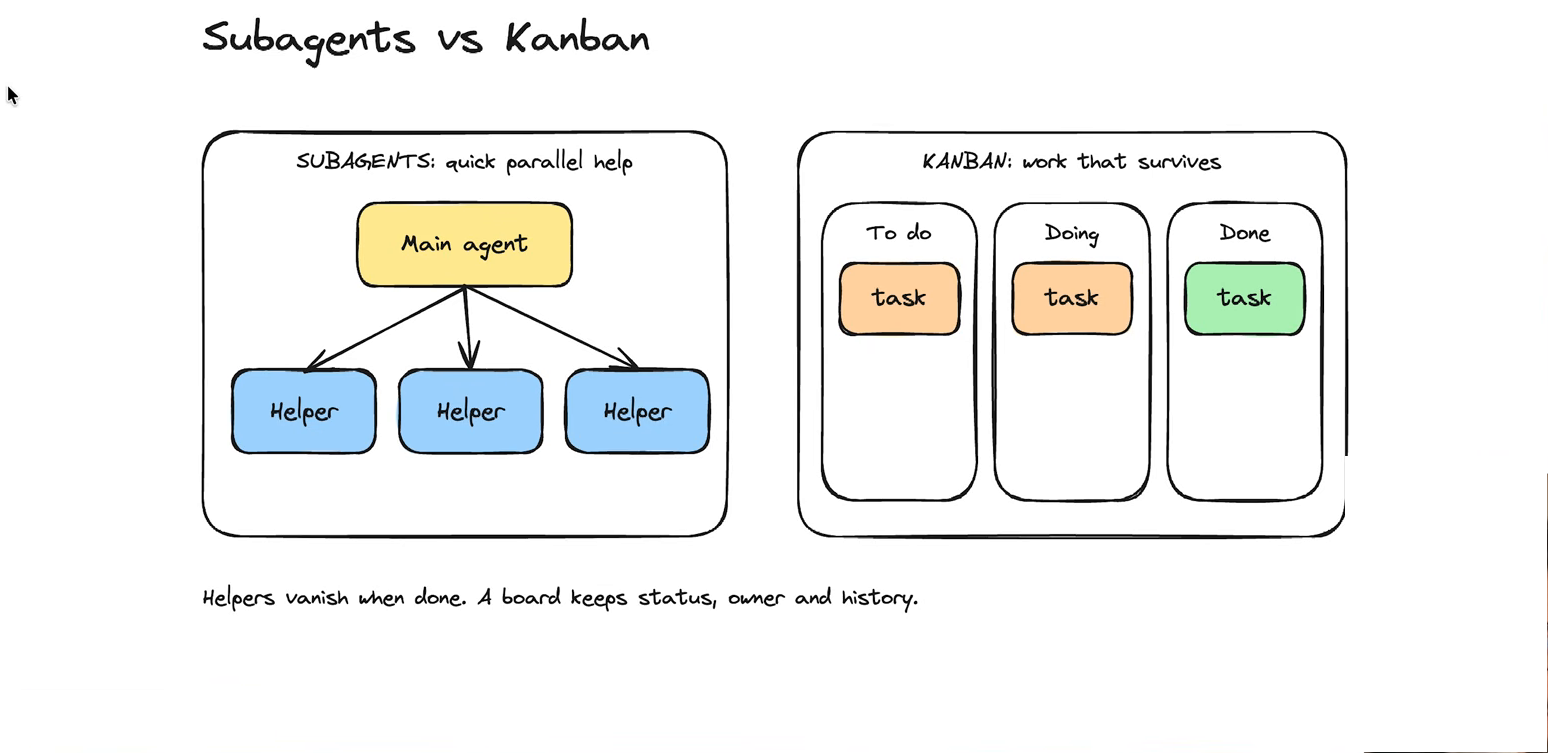
Helpers vanish when done. A board keeps status, owner and history. (Frame @ 34:10.)
15. Permissions, approvals and sandboxing
No single switch covers every risk, so there are layers, each answering a different question:
- who can ask — user authorisation;
- what it can request — the toolset;
- the checkpoints — approvals (which wait for your answer) and hooks (which apply a rule you set in advance, without asking);
- what it can reach — the sandbox.
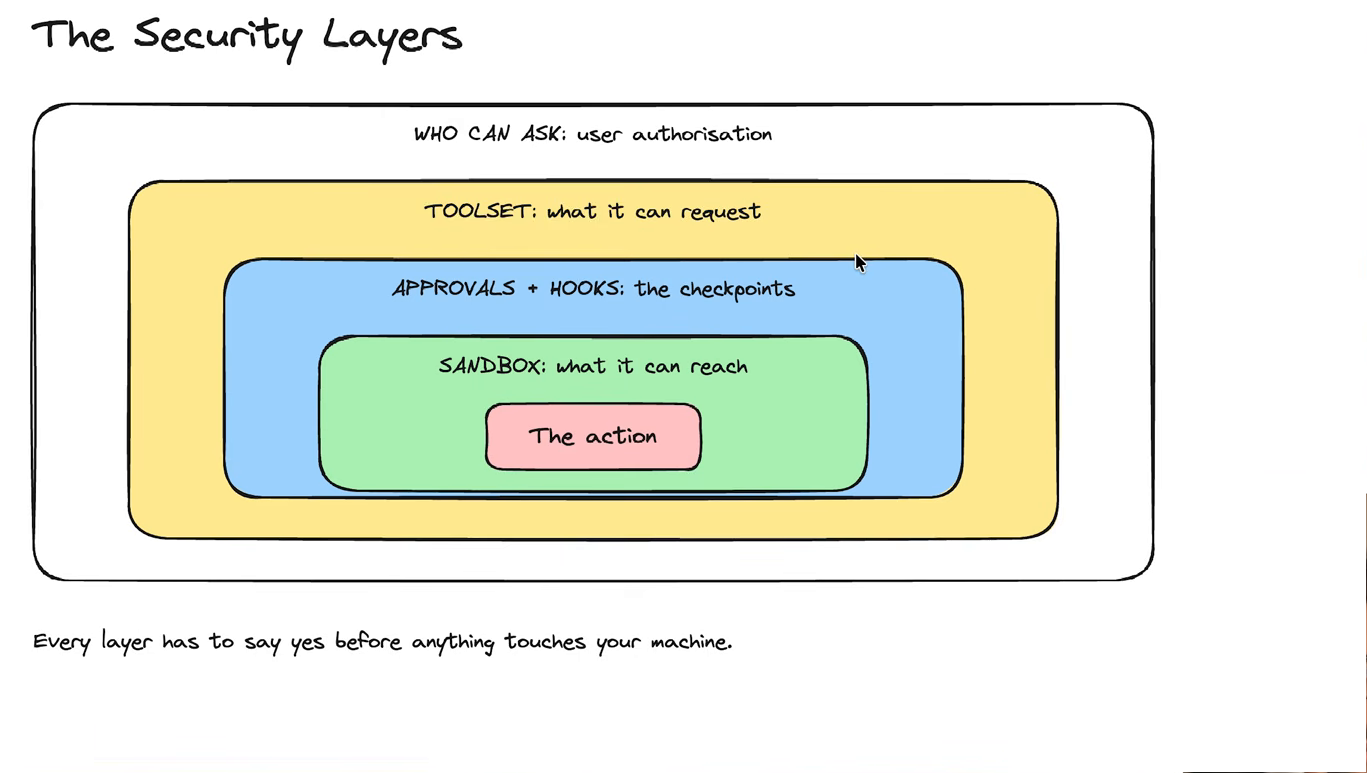
Every layer has to say yes before anything touches your machine. (Frame @ 37:30.)
His practical advice: give each profile the specific permissions, tools and files its role needs, and keep everything else out of reach.
Recap + next steps
The closing five minutes are a recap, followed by a pitch for his own consulting and a case-study list. Skip it unless you want the advert.
Alf’s assessment
What is good here. The harness-versus-model framing is exactly right, and it is the thing beginners get wrong most often — people blame “the AI” for what is really a context, tool or permission problem. The memory / skill / hook distinction is also the cleanest short version of it I have seen, and the “save the correction in the layer it belongs to” line is a rule worth adopting.
Where I would push back. This is a well-made commercial explainer, so a few things should be read with that in mind:
- Profiles are presented more strongly than the product does. He says profiles are “different to subagents” — true — but he is careful, and I would be even firmer: a profile is an organisational separation, not a security wall. If you want a real boundary, that comes from permissions, the toolset and where the thing runs. Anything that calls itself isolation without those is a promise the software can’t keep.
- “Delete the tools you don’t use” is context advice, not a cost panacea. Removing tool definitions shrinks the prompt — genuinely useful — but it costs you capability, and a weak agent that keeps failing burns more tokens than a slightly larger clean prompt. Our own environment reached the same conclusion from the other direction (see 260821 Context Engineering and Hermes Cost Control — AI Labs video): give each specialist the minimum sufficient context for its role, and keep the verification steps for consequential work.
- Everything here is version-specific and dates fast. Model names, prices, “17 chapters of features” — treat the shapes as durable and the specifics as perishable. Where his description and our local installation disagree, our installation and the Hermes documentation win.
- Nothing about consequences. The video explains permissions as a feature list. It doesn’t dwell on what goes wrong when an agent has the wrong tools — which is the part that actually bites in a household with private finance and health data. For a beginner that omission is understandable; for the owner’s son I would pair this video with the permission and isolation notes, not leave it as the only thing he reads.